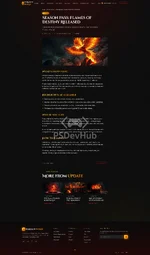
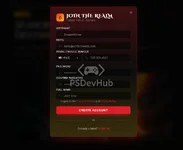
Perfect World Phoenix Template
React SPA + Laravel Export + Static HTML Build
A cinematic Perfect World MMORPG landing page template built with modern frontend technology.
 Overview
Perfect World Phoenix is a modern landing page template for Perfect World MMORPG websites. This template is built as a standalone Vite + React application, powered by TypeScript, Tailwind CSS v4, daisyUI 5, shadcn/ui primitives, and TanStack Query 5.
This template provides 3 main implementation tracks:
- React SPA - The main React-based application located in the root and src/ directory.
- Laravel Export - A Blade + Alpine.js version for Laravel 13 located in laravel-export/.
- Static HTML Build - A portable HTML/CSS/JS version with no build step required, located in dist-html/.
 Main Features
- Standalone Vite + React single-page application.
- React 18.3 with TypeScript 5.8.
- Tailwind CSS v4 with CSS-first configuration.
- daisyUI 5 using a custom perfectworld theme.
- shadcn/ui primitives with around 50 Radix-based components.
- Routing powered by react-router-dom v6.
- Lazy loading for all pages except the homepage.
- TanStack Query 5 for data management.
- Vite 8 with React SWC plugin.
- Laravel Blade/Alpine.js version included.
- Static HTML preview version included.
 Technology Stack
- Frontend: React 18.3, TypeScript, Vite 8
- Styling: Tailwind CSS v4, daisyUI 5
- UI Components: shadcn/ui, Radix primitives
- Data Layer: TanStack Query 5
- Routing: react-router-dom v6
- Testing: Vitest 3, jsdom 29, Testing Library React 16
- Build Tool: Vite + @vitejs/plugin-react-swc
- Fonts: Cinzel Decorative + Inter
 Requirements
- Node.js: Minimum Node.js 20 LTS
- Package Manager: npm recommended
- Alternative: Bun is supported
- OS: Cross-platform, tested on Windows
- Laravel Export: Laravel 13 with PHP 8.3 or newer
 Installation
Run the following command to install all dependencies:
Bash:
npm installOptionally, create a .env.local file in the project root:
Code:
VITE_API_URL=https://api.example.com
VITE_APP_URL=http://localhost:8080
Notes:
- Only variables prefixed with VITE_ are exposed to the frontend.
- The current codebase does not read any VITE_* variables yet, but this convention is prepared for future backend integration.
 Run Development Server
Bash:
npm run devThe development server runs at:
Code:
http://localhost:8080Important notes:
- The development port is 8080, not Vite’s default 5173.
- The HMR overlay is intentionally disabled.
- Keep the terminal visible to check build errors.
 Available Scripts
- npm run dev - Starts the Vite dev server on port 8080.
- npm run build - Creates a production build in the dist/ directory.
- npm run build:dev - Creates a development build with instrumentation.
- npm run preview - Previews the production build from the dist/ directory.
- npm run lint - Runs ESLint.
- npm test - Runs Vitest once in CI mode.
- npm run test:watch - Runs Vitest in watch mode.
 Routes
Routing is configured in src/App.tsx. Every route except the homepage uses lazy loading.
- / - Index
- /news/:category - NewsCategory
- /news/:category/:slug - NewsArticle
- /terms - Terms
- /privacy - Privacy
- /eula - Eula
- /faq - Faq
- * - NotFound
When adding or removing routes, make sure to update these files as well:
- src/App.tsx
- public/sitemap.xml
- public/robots.txt
 Testing
The test runner uses Vitest 3 with the jsdom environment.
Test commands:
Bash:
npm test
npm run test:watch
npx vitest run src/path/to/file.test.tsx
npx vitest run -t "partial test name"
Testing setup:
- src/test/setup.ts registers matchers from Testing Library.
- window.matchMedia polyfill is included.
- Test discovery pattern: src/*/.{test,spec}.{ts,tsx}.
- For components using Router or React Query, use MemoryRouter and a fresh QueryClient for each test.
 Project Structure
Code:
.
├── .junie/ Project-specific agent guidelines and skills
├── .claude/ Claude-specific skill definitions
├── public/ Static assets, robots.txt, sitemap.xml, favicons
├── src/
│ ├── assets/ Images and static media
│ ├── components/
│ │ ├── site/ Page and feature components
│ │ ├── ui/ shadcn/ui primitives
│ │ └── NavLink.tsx Shared navigation link component
│ ├── hooks/ Custom hooks
│ ├── lib/ utils.ts and site-data.ts
│ ├── pages/ Route components
│ ├── test/ Test setup and examples
│ ├── App.tsx Router and providers
│ ├── App.css Minimal app-level CSS
│ ├── main.tsx Vite entry point
│ └── index.css Tailwind v4 and daisyUI theme
├── laravel-export/ Blade and Alpine.js port for Laravel 13
├── dist-html/ Static HTML/CSS/JS build
├── components.json shadcn/ui configuration
├── eslint.config.js ESLint flat config
├── index.html SEO and OpenGraph meta
├── postcss.config.js PostCSS pipeline
├── vite.config.ts Vite config
└── vitest.config.ts Vitest config UI & Styling Conventions
- Use cn() from @/lib/utils to combine Tailwind classes.
- Avoid manual template-string concatenation for complex conditional classes.
- shadcn/ui components use lowercase filenames.
- Page and feature components use PascalCase.
- Use Tailwind v4 and daisyUI tokens.
- No CSS Modules or styled-components.
- The main theme is named perfectworld.
- Tailwind animation utilities are powered by tw-animate-css.
 Path Alias
The following alias is used in this project:
Code:
@/* => src/*This alias is configured in:
- tsconfig.app.json
- vite.config.ts
- vitest.config.ts
shadcn/ui sub-aliases such as @/components, @/components/ui, @/lib/utils, and @/hooks are defined in components.json.
 Vite Dedupe List
The Vite config deduplicates the following dependencies:
- react
- react-dom
- react/jsx-runtime
- react/jsx-dev-runtime
- @tanstack/react-query
- @tanstack/query-core
Important: Do not remove this list, because doing so may cause React hooks issues, duplicate React copies, or broken QueryClient context.
 Export Tracks
1. Laravel Export
The laravel-export/ folder contains a Blade + Alpine.js + daisyUI port that can be used in a Laravel 13 project.
This is suitable for teams that want to use the landing page directly in Laravel without the React SPA.
2. Static HTML Build
The dist-html/ folder contains a static HTML/CSS/JS version that can be used without any build step.
For a quick preview:
Code:
npx serve dist-html Laravel Backend Pairing
There are two possible Laravel approaches:
- Laravel Export - Use the laravel-export/ folder as the Blade/Alpine.js version for Laravel 13.
- React SPA + Laravel API - Use this SPA as a standalone frontend and connect it to a Laravel 13 + Sanctum backend.
Important note:
Do not directly move the React SPA src/ folder into Laravel’s resources/js.
Reasons:
- This project’s Vite configuration is designed for a standalone SPA.
- The dedupe list is already customized.
- The development server uses port 8080.
- Certain development plugins are prepared for the SPA workflow.
- This setup may conflict with laravel-vite-plugin.
 Deployment
To create a production build:
Bash:
npm run buildThe build output will be generated in:
Code:
dist/The dist/ folder can be uploaded to static hosting, a CDN, or a regular web server.
When public routes change, update these files as well:
- public/robots.txt
- public/sitemap.xml
 Documentation Map
- README.md - Quickstart, scripts, routes, and project structure.
- laravel-export/README.md - Documentation for the Laravel Blade/Alpine.js version.
- dist-html/README.md - Documentation for the static HTML/CSS/JS version.
- .junie/AGENTS.md - Engineering notes and backend integration contract.
- .junie/skill/perfect-world-phoenix/SKILL.md - Agent guide for Junie.
- .claude/skills/perfect-world-landing/SKILL.md - Agent guide for Claude.
 License
There is currently no LICENSE file available in the repository.
Recommendations:
- Use MIT if the template will be open-source.
- Use Apache-2.0 if you want an open-source license with patent protection.
- Use a Proprietary License if this template is a paid or private product.
Perfect World Phoenix Template
Modern, cinematic, flexible, and ready for Perfect World MMORPG landing pages.
React SPA Laravel Export
 Static HTML Build